(🇪🇸 Leer la versión en español aquí)
Same legacy Windows protocol trap, different month. In its November 2026 Patch Tuesday drop, Microsoft shipped fixes for CVE-2026-124194, an actively exploited spoofing flaw in Microsoft Office Outlook that landed straight into CISA's Known Exploited Vulnerabilities (KEV) feed on November 10 with a November 24 remediation deadline under BOD 26-04.
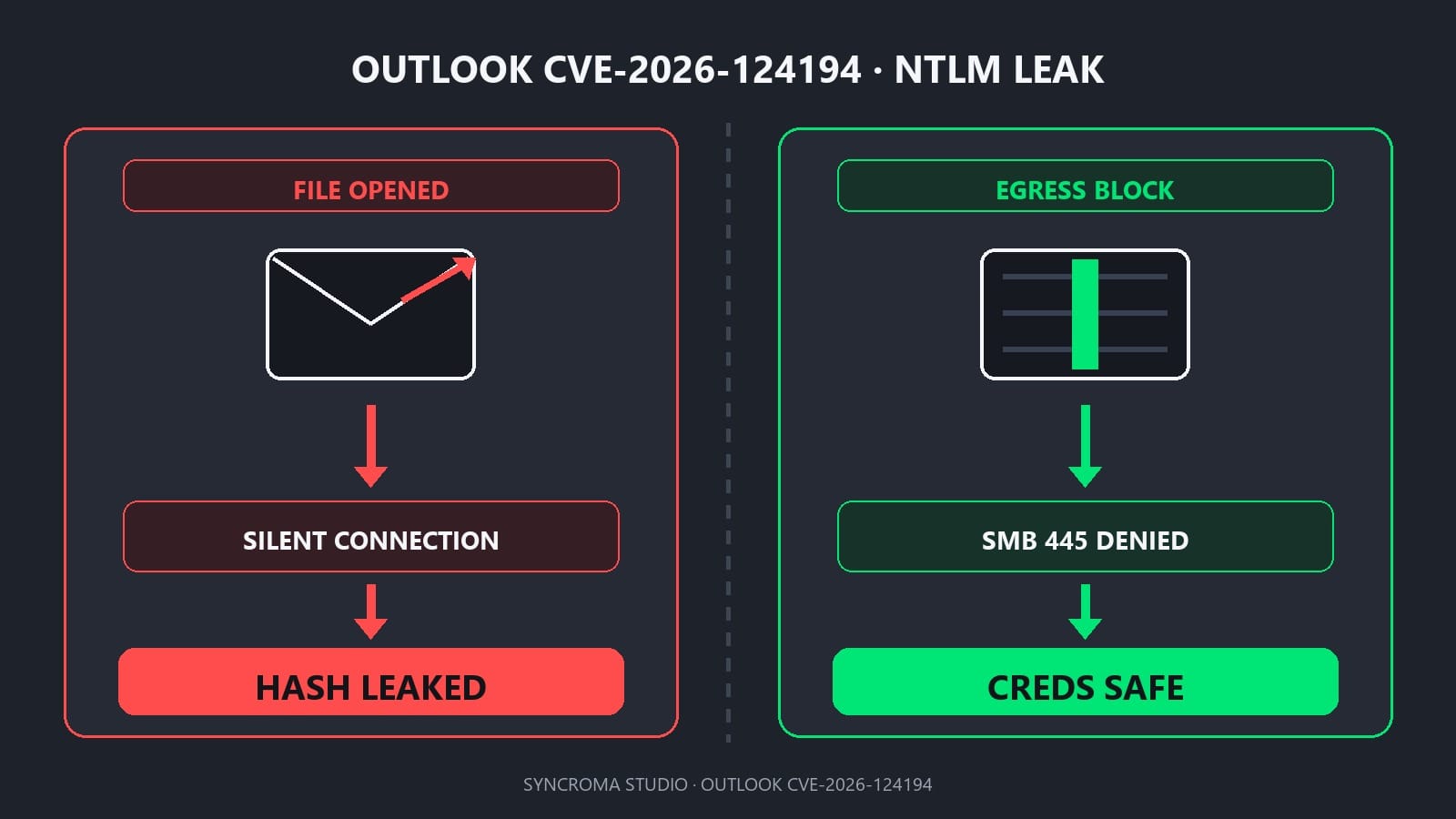
Don't let the 6.5 CVSS v3.1 base score (AV:N/AC:L/PR:N/UI:R/S:U/C:H/I:N/A:N, logged in NVD) lull anyone to sleep. Look straight at that High Confidentiality (C:H) flag and Microsoft's own advisory FAQ: opening a crafted message file in an unpatched Outlook client forces an outbound connection to an attacker-controlled network target without showing the usual external-content prompt — silently leaking the victim's NTLMv2 authentication hash.
The Architectural Root Cause: Automatic Outbound NTLM Is Still Armed
Microsoft tracks CVE-2026-124194 under CWE-356 (Product UI does not Warn User of Unsafe Actions). Reading Microsoft's exact FAQ on MSRC strips away the guesswork:
- The Preview Pane is NOT an attack vector here; exploitation requires convincing the user to open the crafted Office/Outlook message file (
UI:R). - What actually fires under the hood: Once opened, Outlook initiates an external connection with zero warning banner. Left to default Windows settings, the OS obligingly performs an automatic challenge-response handshake using the user's NTLM protocol credentials.
- Why attackers love NTLMv2 leaks: Those captured hashes can be cracked offline at brutal GPU speeds against weak passwords or relayed directly into internal Windows/AD endpoints that still lack strict SMB/LDAP signing enforcement.
Patching Office closes one UI bypass until the next file parser or protocol handler slips through. Letting managed endpoints fire NTLM handshakes across untrusted networks is an architectural footgun that keeps recurring regardless of how many Patch Tuesdays you apply.
Patching Outlook vs Shutting Down the Egress Pipe
Instead of treating every Office advisory like whack-a-mole, sysadmins cut off the entire NTLM-over-WAN blast radius at two choke points:
| Defense Layer | What It Actually Stops | Operational Friction | Enough on Its Own? |
|---|---|---|---|
| November 2026 Microsoft Office / Outlook patch | Closes CVE-2026-124194 silent external connection bypass |
Minimal (Office update + restart) | No — another client/UNC parser bug will follow |
| Drop outbound TCP 445 (SMB) at perimeter & endpoint VPN | Blocks workstations from sending SMB traffic to public internet IPs | Near zero (nobody should mount public SMB shares) | Mandatory baseline for corporate & remote fleets |
| GPO: Restrict NTLM: Outgoing NTLM traffic to remote servers | Prevents Windows from transmitting NTLMv2 hashes to unauthorized hosts |
Moderate (audit legacy non-Kerberos apps first) | Yes, especially paired with required SMB & LDAP signing |
And while you're stripping hidden overhead out of critical decisions, check out our new Home Closing Costs & Mortgage Calculator or browse the full Syncroma Tools Suite.
Three Concrete Steps for Windows & Office Teams Today
- Roll out Microsoft's November 2026 Office updates immediately across Microsoft 365 Apps, Office LTSC 2021, and Office LTSC 2024 per CVE-2026-124194.
- Audit firewall and VPN split-tunnel rules for outbound TCP 445: Make sure no endpoint can complete an external SMB handshake outside trusted internal segments.
- Audit then deny outgoing NTLM via Group Policy and enforce SMB signing across your domain so a leaked challenge-response can neither escape the perimeter nor relay inside it.
Cover photo credit: Intel Free Press via Wikimedia Commons (CC BY-SA 2.0). Technical infographic by Syncroma Studio.
Sistemas reales, sin humo corporativo Real systems, zero corporate hype
Recibe los análisis a fondo sobre arquitectura, consumo de recursos y computación de bajo nivel directamente en tu bandeja de entrada. Get deep-dive software architecture, resource consumption metrics, and low-level computing essays delivered straight to your inbox.
Suscribirse a Syncroma Subscribe to Syncroma