
(🇪🇸 Leer la versión en español aquí)
The trajectory of personal productivity software in Redmond follows a relentless, predictable script: acquire consumer beloved innovators, drain their technical snappiness, wrap them inside bloated corporate enterprise frameworks, and discard free consumer users the second they fail to justify high-margin cloud subscriptions.
Microsoft has officially confirmed the final retirement date for Microsoft To Do: on June 30, 2027, every client across Web, Windows, macOS, iOS, and Android will be permanently discontinued. Eleven years after acquiring Berlin-based Wunderlist for an estimated $100M–$150M in 2015, and six years after executing the original app in May 2020 behind promises of deep Exchange Online integration, Microsoft is concluding the story with an unapologetic technical slap: personal accounts are completely barred from migrating.
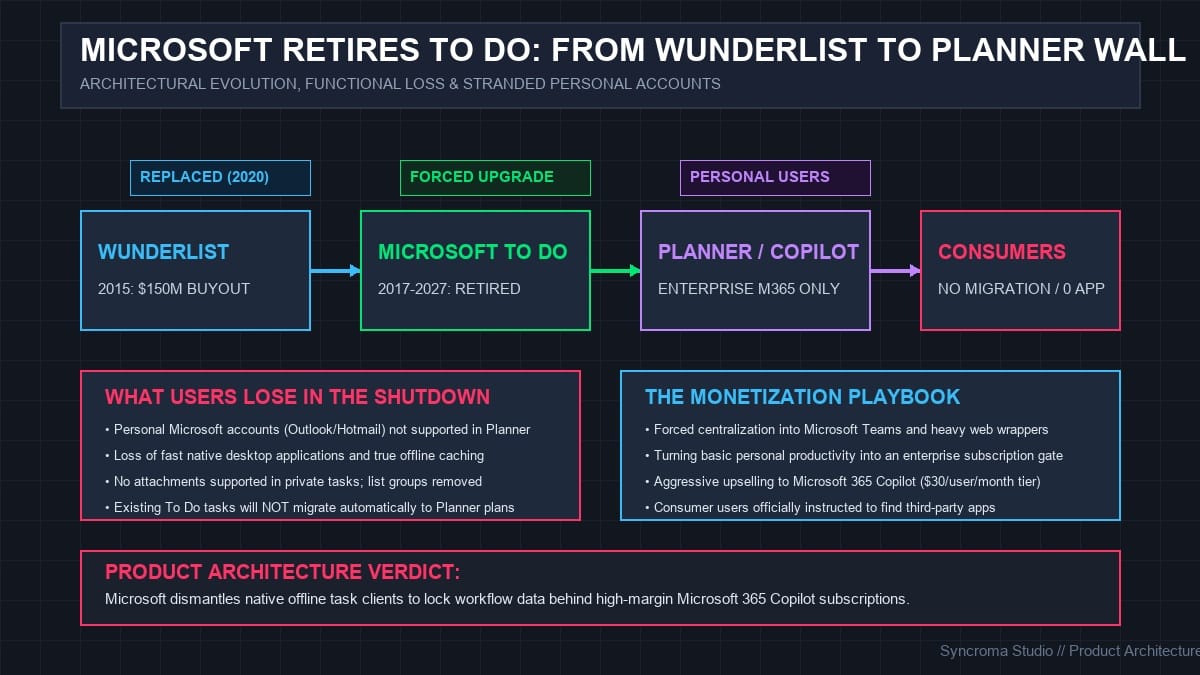
Infographic: From the $150M Wunderlist acquisition to stranding personal accounts outside Microsoft Planner. Credit: Syncroma Studio.
1. The Official Verdict for Free Accounts: "Find Another App"
On Microsoft's official support portal, corporate diplomacy gives way to brutal clarity. For any consumer operating with a free personal Microsoft account (@outlook.com, @hotmail.com, or standard MSA credentials), the official instruction is unequivocal:
"Planner does not support personal Microsoft accounts. We recommend choosing another task-management application that meets your needs."
There is no streamlined lightweight tier, no native consumer bridge, and no transparent automated migration tool. Millions of individuals who entrusted their daily workflows, household routines, and personal projects to Microsoft's ecosystem over the last decade are told to migrate to Todoist, TickTick, or Apple Reminders.
Even paying Microsoft 365 Personal or Family subscribers—who pay annual recurring fees for Office apps and 1 TB of OneDrive cloud storage—are treated as second-class citizens: Planner remains strictly walled behind Microsoft Entra ID (formerly Azure Active Directory) commercial enterprise and educational licensing.
2. Technical Degradation: From Sub-50ms Native Clients to Web Bloat
The death of Wunderlist in 2015 traumatized engineers and power users because Wunderlist proved that a hyper-optimized local SQLite cache with instantaneous WebSocket delta-sync could deliver interaction latency well below 50 ms. It launched in 300 ms and functioned flawlessly in offline scenarios without dropping a single keystroke.
When Microsoft attempted to rebuild that experience inside To Do, it required half a decade of painful engineering because it forced task data into legacy Exchange mailbox architectures (IPM.Task objects and hidden MAPI hierarchy folders).
The scheduled transition into Microsoft Planner marks an even deeper architectural regression:
- Native Binaries Abandoned: Where To Do featured lean, fast C++/C# client binaries on Windows and native Swift on macOS, Planner is an Electron-wrapped Single Page Application (SPA) embedded directly inside Microsoft Teams or isolated web views. Working set RAM usage skyrockets from ~65 MB in native To Do to over 450 MB in browser and Teams runtime processes.
- Zero True Offline Resilience: Planner relies on continuous synchronous connectivity with Microsoft Graph API endpoints to evaluate access control lists, tenant permissions, and SharePoint backing stores. The reliable offline caching that protected users in air travel or spotty cellular coverage is gone.
- Missing Private Task Attachments: In the current Planner release, private personal tasks do not support direct file attachments, forcing manual linking to external OneDrive URLs.
- List Hierarchy Stripped: The organizational power of custom list groups and structured hierarchies gives way to rigid Kanban buckets hard-coupled to Microsoft 365 group architectures.
3. No Automated Task Migration: Manual Friction for Enterprise IT
Even inside enterprise organizations holding active Microsoft 365 E3/E5 commercial licensing, the migration path is far from seamless. Existing tasks in Microsoft To Do will not automatically transfer to Planner's private plan views.
Workers and IT departments must manually triage and trigger task transfers, risking fragmented synchronization with Outlook flagged emails and broken Power Automate connectors.
Engineering teams running internal automation via Microsoft Graph API will face breaking changes: endpoints anchored to /me/todo/lists must be overhauled to target /planner/plans and /planner/tasks, navigating vastly different concurrency models, strict 429 throttling limits, and complex schema requirements.
4. The Bottom Line: Funneling Users Behind the Copilot Paywall
Why dismantle a functional, low-maintenance task tool that drove everyday consumer brand loyalty? The answer lies directly on the balance sheet and Microsoft's desperate bid to monetize generative AI:
| Architectural Metric | Microsoft To Do (2020-2026) | Microsoft Planner / M365 (2027+) |
|---|---|---|
| Personal Accounts | 100% Fully Supported (Free) | Completely Blocked / 0 Support |
| Client Architecture | Lean Native Binary (< 80 MB RAM) | Heavy Web Wrapper / Teams (> 450 MB) |
| Offline Synchronization | Local SQLite Engine | Graph API Dependency (Online Required) |
| Monetization Engine | Included with Microsoft Account | Enterprise Seat + Copilot ($30/user/mo) |
| Attachment Handling | Direct 25 MB file storage | Heavily restricted in private task plans |
In Microsoft's modern corporate calculus under Satya Nadella, a standalone lightweight task application does not generate the ARPU (Average Revenue Per User) needed to justify server rack space unless it funnels enterprise customers into Microsoft 365 Copilot ($30/user/month on top of base licensing).
By driving all task orchestration into the Planner/Teams container, enterprise sales reps gain immediate leverage to pitch synthetic Gantt charts, automated meeting breakdowns, and LLM-generated sprint plans.
For everyday users who simply wanted a fast, native checklist to track their daily lives, the message is unvarnished: unless you pay enterprise seat premiums, your data is an unwelcome overhead in Microsoft's cloud datacenters.
Sistemas reales, sin humo corporativo Real systems, zero corporate hype
Recibe los análisis a fondo sobre arquitectura, consumo de recursos y computación de bajo nivel directamente en tu bandeja de entrada. Get deep-dive software architecture, resource consumption metrics, and low-level computing essays delivered straight to your inbox.
Suscribirse a Syncroma Subscribe to Syncroma