(🇪🇸 Leer la versión en español aquí)
Every time a massive open-world flagship hits store shelves, the exact same hardware question dominates social feeds: if players spend $700/€800 on a PlayStation 5 Pro packing a heavily upgraded GPU and PSSR neural upscaling hardware, why is Grand Theft Auto VI still locked to 30fps without even a 40fps VRR mode?
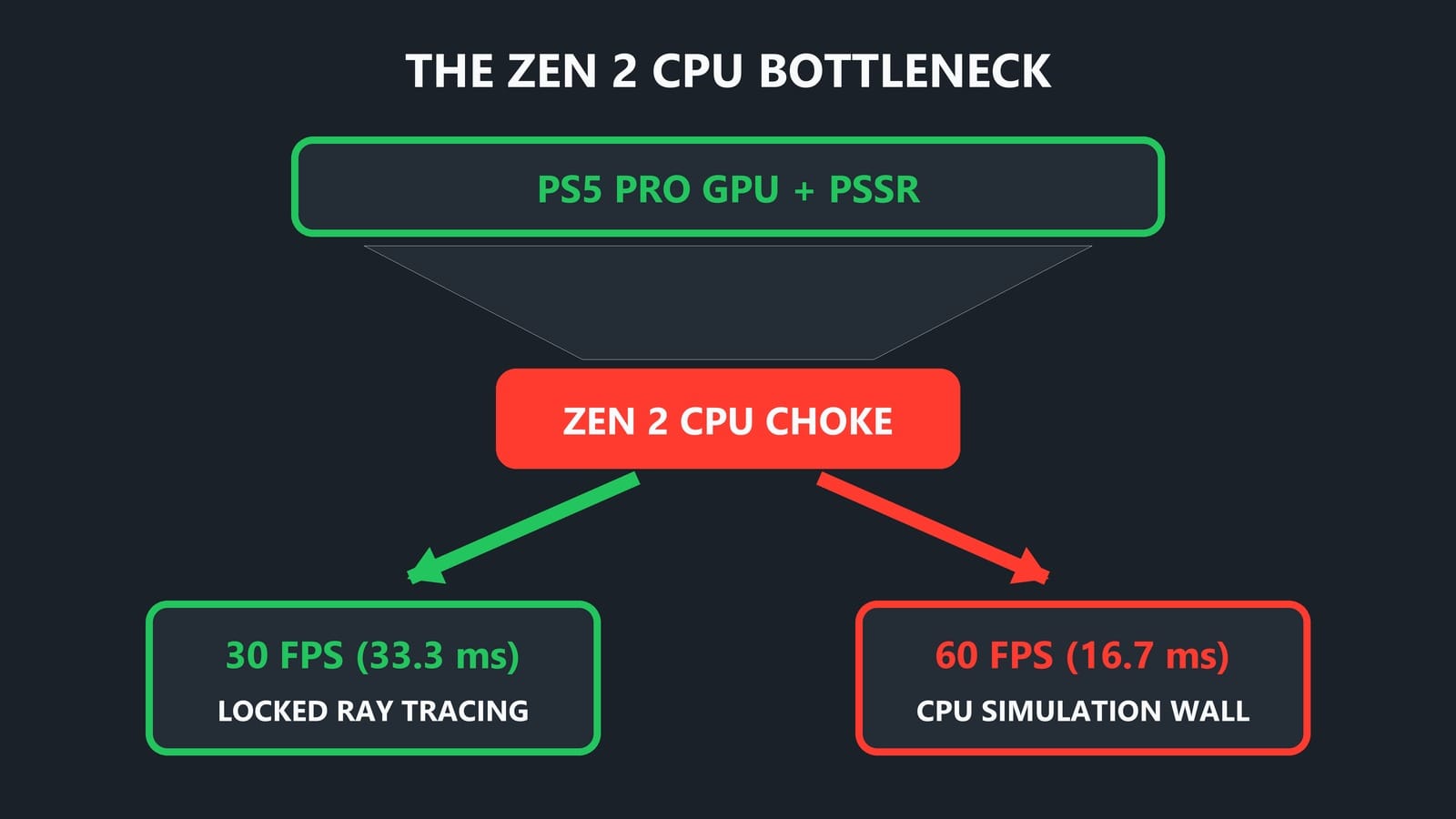
It isn't arbitrary laziness on Rockstar's part. According to Digital Foundry's launch technical analysis and follow-up engineering breakdowns reported via TweakTown, the constraint boils down to textbook computer architecture: Amdahl's Law and a hard CPU simulation ceiling anchored on 2020 AMD Zen 2 silicon.
Frame-Time Math: 33.3 ms vs. 25.0 ms vs. 16.7 ms
Thinking in frames per second hides the actual scheduling math game engines live under. What matters is frame time (1,000 ms ÷ FPS):
| Frame-Rate Target | Frame-Time Budget | Base PS5 Real Behavior | PS5 Pro Real Behavior |
|---|---|---|---|
| 30 fps | 33.33 ms | Holds ~30fps but dips to 24–25fps during dense traversal or heavy explosions | Substantially steadier 30fps lock across normal play (rare brief dips to 24–26fps under chaos) |
| 40 fps (120Hz VRR) | 25.00 ms (−25% time) | Unachievable without stripping world sim | Ruled non-viable by Digital Foundry without major NPC/asset cutbacks |
| 60 fps | 16.67 ms (half time) | Beyond 8-core Zen 2 throughput ceiling | CPU-bound wall: PSSR slashes pixel cost, not CPU world logic |
This explains the biggest hardware misconception around mid-generation consoles: GPU upgrades and machine-learning upscalers like Sony's PlayStation Spectral Super Resolution (PSSR) only shrink GPU shading time (T_GPU). Before the GPU ever rasterizes a single triangle, the CPU must advance dense pedestrian state machines, urban traffic pathfinding, hair physics, streaming geometry decompression, and ray-tracing BVH updates.
Because the PS5 Pro shares the same 8-core Zen 2 CPU baseline as the launch 2020 console—with only a modest clock bump rather than a new CPU microarchitecture—squeezing Leonida's main simulation loop inside 16.67 ms (or even 25 ms) simply isn't happening without hollowing out the open world.
So Where Does PS5 Pro's Extra Horsepower Actually Go?
Unable to double frame output past the CPU wall, Rockstar points the Pro's extra GPU budget straight at image fidelity within the 33.3 ms window:
- PSSR 4K reconstruction: Cleaner edge stability across foliage, hair, and fine distant signage compared with standard spatial/temporal scaling on base hardware.
- Richer ray-traced shadows and reflections: Visual upgrades dialed back on base PS5 and Xbox Series X.
- Superior frame-time stability: While Digital Foundry measured launch PS5 hardware dropping into the mid-20s during high-chaos combat, PS5 Pro shrugs off routine GPU pressure and recovers faster.
Want to test exact millisecond budgets yourself—seeing how PSSR/DLSS/FSR shifts a frame from GPU-bound to CPU-bound alongside real console wall-power electricity costs per month? Try our new FPS Frame Time (ms), CPU/GPU Bottleneck & Gaming Power Cost Calculator. You can also benchmark pre-load network times with our 212 GB Download Time & Usable SSD Storage Calculator and read our breakdown separating RAGE Engine reality from generative AI hype in GTA 6.
Systems Engineering Takeaway
Every heterogeneous pipeline—from console SoCs to distributed cloud backends—runs strictly at the speed of its slowest synchronous stage. Throwing extra GPU shader throughput or ML upscalers at pixels never cures a Zen 2 CPU simulation bottleneck running up against a 33.3 ms wall, just as scaling web worker replicas never fixes a single-threaded database lock.
Technical analysis infographics by Syncroma Studio. Editorial cover photograph via Wikimedia Commons (Howardcorn33, CC0).

Sistemas reales, sin humo corporativo Real systems, zero corporate hype
Recibe los análisis a fondo sobre arquitectura, consumo de recursos y computación de bajo nivel directamente en tu bandeja de entrada. Get deep-dive software architecture, resource consumption metrics, and low-level computing essays delivered straight to your inbox.
Suscribirse a Syncroma Subscribe to Syncroma