(🇪🇸 Leer la versión en español aquí)
For roughly a decade, developers, gamers, and open-source teams treated Discord as semi-private living-room chat — dropping debug traces, email contacts, and candid opinions behind an invite-or-login wall. Starting today, November 16, 2026, that boundary breaks down: Discord rolls out automated AI Server Web Pages across more than 63,000 Discoverable Servers, setting the stage for individual member messages to surface inside Google Search results by mid-December, as detailed in the official Discord announcement, Mashable, SC Media, and GBlock.
While private servers, DMs, and group DMs stay untouched, the fine print behind Discoverable Server defaults leaves far more real-world exposure than Discord's reassurance implies.
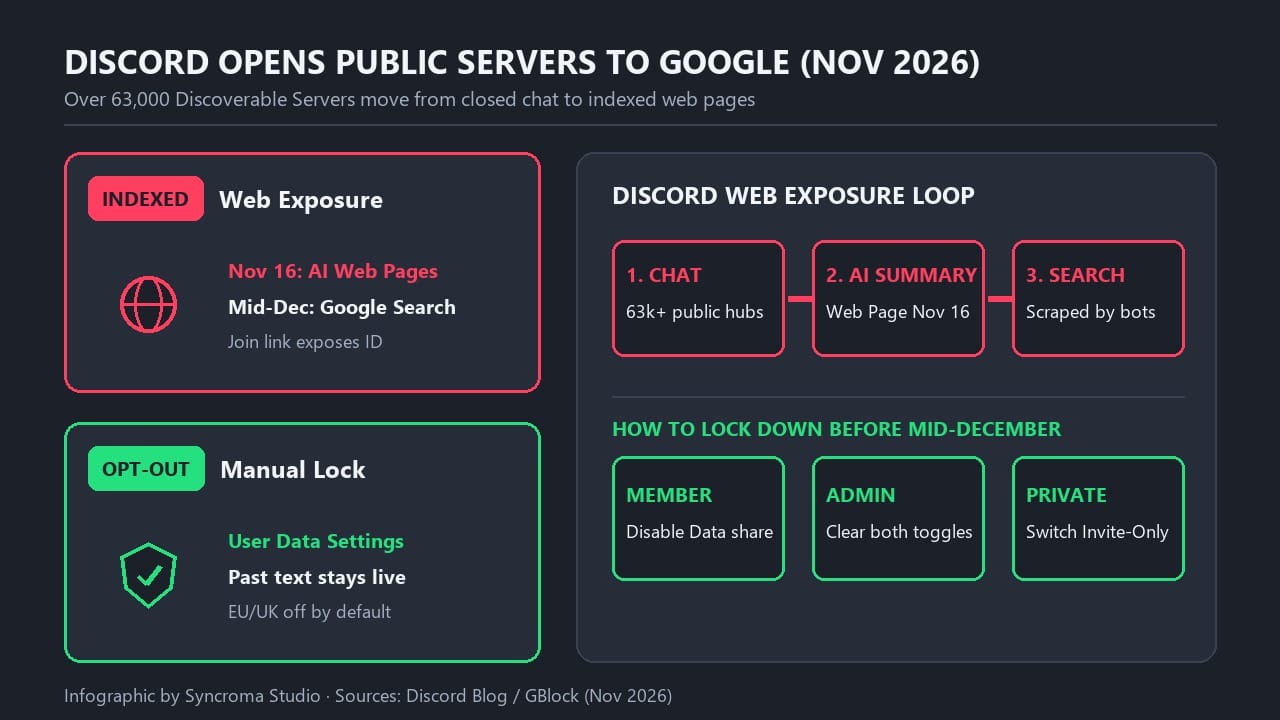
What Goes Live Today vs. Mid-December (Verified Rollout)
The change hits Discoverable Servers specifically — public communities with at least 1,000 members and eight weeks of history listed in Server Discovery:
| Rollout Milestone / Control | Official Discord Behavior | The Privacy Catch Nobody Mentions |
|---|---|---|
| Nov 16, 2026: Server Web Pages | Every Discoverable Server gets a public page with AI channel summaries | Published automatically even if admins never set up a web profile page |
| Mid-Dec 2026: Channel Messages | Individual public-channel replies appear on web pages & Google Search | Strips usernames/avatars, yet support channels still leak emails, domains & logs |
| Regional Defaults | EU/EEA, UK, Canada, Brazil, Australia & South Korea default off (+ teens) | Outside those regions, accounts start opted IN by default |
Member Switch (Data & Privacy) |
Global toggle hides future messages across Discoverable Servers | Not a history wipe — earlier eligible text remains unless deleted individually |
Admin Panel (Web Presence) |
Separate channel lists for Summaries & Messages (both ON by default) | Turning channels off never deletes the Server Web Page itself while Discoverable |
Why "We Hide Your Username" Fails Basic Adversarial Thinking
Discord's centerpiece privacy pitch is that Google-indexed quotes omit usernames and profile avatars. As GBlock's technical breakdown highlights, that safeguard falls apart in practice for three reasons:
- The Join Button breaks anonymization in 10 seconds: The entire commercial point of Server Web Pages is funneling search visitors straight into communities via a prominent Join link. Anyone finding a snippet on Google can click into the Discoverable Server, paste the exact phrase into Discord's built-in search bar, and recover the original username, timestamp, and surrounding context immediately.
- A fresh harvest for email & phishing scrapers: Tech support and job-board channels inside large public servers are packed with troubleshooting emails, company handles, and stack traces previously hidden behind Discord authentication. Moving text onto raw HTML open-web pages hands automated crawlers free scraping fuel with zero Discord bot tokens required.
- AI-written channel summaries carry zero accuracy guarantees: Discord acknowledges its automated channel summaries are generated by AI and "may not always be accurate," meaning noisy hallway chatter gets distilled onto public branded pages unless admins manually curate or opt out.
How to Lock Down Your Account and Server Before Mid-December
- For individual users (takes 20 seconds): Open User Settings > Data & Privacy and disable Show my message content from Discoverable channels on web pages. Do this even inside EU/UK opt-out regions so future app updates don't surprise you, and delete any old sensitive messages in 1,000+ member servers now (remember: deleting on Discord does not instantly flush third-party search caches).
- For community admins running 1,000+ member servers: Navigate to Server Settings > Community > Web Presence and explicitly uncheck both Channel Summaries and Channel Messages (both ship enabled by default). If you want zero public web footprint altogether, switching access to Invite Only or Apply to Join exits Discovery and drops the Server Web Page.
- If you run your own sites, docs, or APIs: Never outsource data boundaries to someone else's default toggle. Audit crawler permissions on your own domain with our private AI-blocker
robots.txtgenerator, strip tracking parameters before sharing links in public rooms via the private URL & UTM cleaner, and verify strict origin isolation on your endpoints using our private HTTP CORS header builder.
When a free chat platform matures, its private archive becomes tempting SEO inventory: ten years of helpful troubleshooting quietly re-packaged into open-web pages for Google traffic.
Article and infographic by Syncroma Studio. Cover photo: Wireless headphones resting on laptop keyboard, photographed by Álvaro Bernal on Wikimedia Commons (CC0).

Sistemas reales, sin humo corporativo Real systems, zero corporate hype
Recibe los análisis a fondo sobre arquitectura, consumo de recursos y computación de bajo nivel directamente en tu bandeja de entrada. Get deep-dive software architecture, resource consumption metrics, and low-level computing essays delivered straight to your inbox.
Suscribirse a Syncroma Subscribe to Syncroma